> For the complete documentation index, see [llms.txt](https://docs.solmatebot.com/llms.txt). Markdown versions of documentation pages are available by appending `.md` to page URLs; this page is available as [Markdown](https://docs.solmatebot.com/telegram-bot/settings-and-customization.md).
# Settings & Customization
Customize your Telegram bot experience — explorers, buttons, and filters.
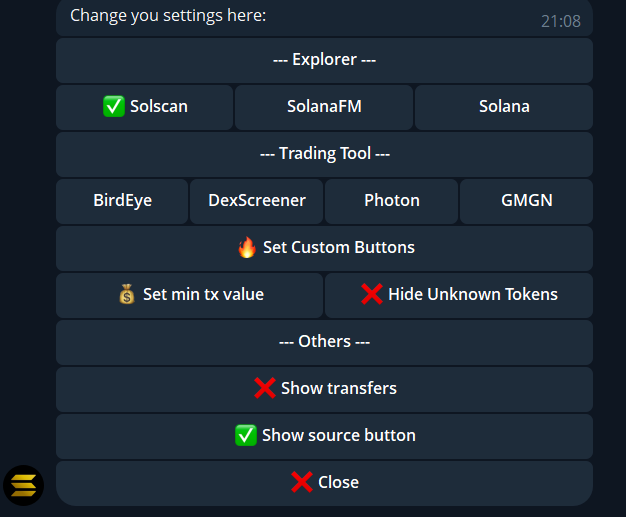
Tap **Settings** from the main menu to configure your Telegram bot preferences.
The Telegram settings menu
## Explorer Selection
Choose which blockchain explorer is used in notification links:
* **Solscan** (default)
* **SolanaFM**
* **Solana Explorer**
Tap the explorer name to select it. A checkmark indicates the active selection.
## Trading Tool Selection
Choose which token viewer is linked in notifications:
* **Birdeye** (default)
* **DexScreener**
* **Photon**
* **GMGN**
* **Axiom**
## Custom Buttons
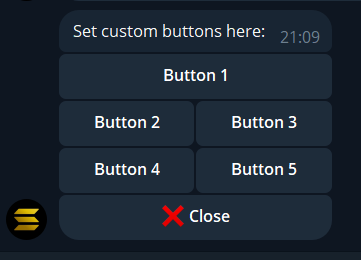
You can configure up to **5 custom buttons** that appear on each transaction notification. Each button can be set to any of these:
### Explorers
* Solscan (Transactions or Tokens)
* SolanaFM (Transactions or Tokens)
* Solana Explorer (Transactions or Tokens)
### Trading Bots
* Trojan Bot, BonkBot, BananaGun, Shuriken, SolTradingBot, BullX, Plonk, GMGN TG, TradeWiz, Axiom, Bloom
### Token Viewers
* Birdeye (Tokens or Wallet), DexScreener, Photon, GMGN (Tokens or Wallet), Jupiter, RugCheck, PumpFun
Configuring custom notification buttons
## Notification Filters
### Minimum transaction value
Set a minimum USD value for notifications. Transactions below this amount are silently ignored.
* Tap **Set min tx value**
* Enter the amount (minimum $0.01)
* Useful for filtering out spam and dust transactions
### Hide unknown tokens
Toggle this to hide notifications for tokens that don't have price data. Keeps your notifications clean from obscure or spam tokens.
### Show transfers
Toggle SOL and token transfer notifications on or off. When disabled, you'll only see swap and trading activity.
### Show source button
Toggle whether a "Jupiter" or "Raydium" source button appears on swap notifications.