> For the complete documentation index, see [llms.txt](https://docs.solmatebot.com/llms.txt). Markdown versions of documentation pages are available by appending `.md` to page URLs; this page is available as [Markdown](https://docs.solmatebot.com/getting-started/using-slash-commands.md).
# Using Slash Commands
New to Discord bots? Here's how commands work.
## What are slash commands?
Solmate uses Discord's built-in **slash commands**. This means you type `/` followed by the command name to interact with the bot.
## How to use them
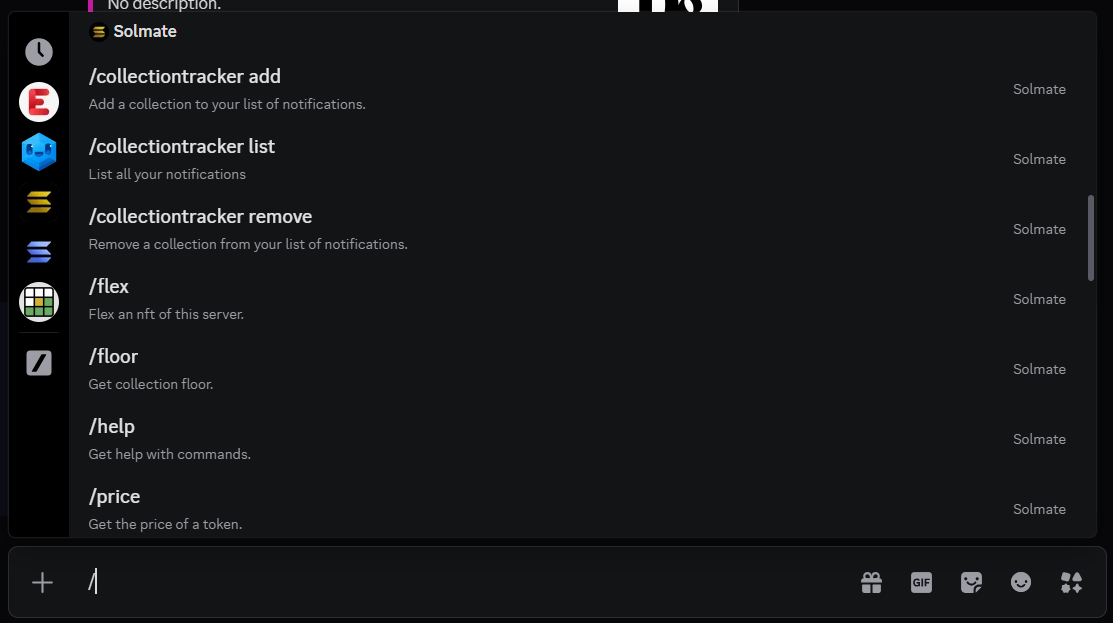
### Step 1: Type `/`
Start by typing a forward slash (`/`) in any text channel. A menu will appear showing all available commands from bots in the server.
The slash command menu appears when you type /
### Step 2: Find the command
You can scroll through the list or start typing the command name to filter results. Look for commands with the Solmate icon.
Type the command name to filter
### Step 3: Fill in the options
Some commands have **required** and **optional** arguments. Required arguments are marked and must be filled in before you can run the command. Optional arguments can be left blank.
Fill in the command options
### Step 4: Press Enter
Hit **Enter** to run the command. The bot will respond in the same channel.
## Tips
* You can use **Tab** to move between arguments
* Type the command name after `/` to quickly find it (e.g., `/tracker`)
* Some commands have **subcommands** — for example, `/tracker add`, `/tracker list`, `/tracker remove`
* If you don't see Solmate's commands, make sure the bot has permission to use slash commands in that channel